Admission management software, from first enquiry to enrolled student.
Capture every enquiry, follow up on time, take applications online and move approved students straight into your records.
Admission season is a pipeline problem
Most schools do not lose admissions because families dislike the school. They lose them because an enquiry arrived on a Saturday, was written in a notebook, and nobody called back for a week. Admissions is a pipeline: enquiry, visit, application, document check, decision, fee. Every hand-off between people is a place where a family can quietly drop out.
Schoolo puts the whole pipeline in one place, so the front office, the admissions head and the principal are all looking at the same list.
Step 1: capture enquiries, wherever they come from
Schoolo includes a public enquiry form you can place on your school website, and the front desk can add enquiries by hand for phone calls and walk-ins. Each enquiry records its source: website form, walk-in, phone call, referral, social media or other. That tells you which channel actually brings families, not just which one feels busy.
Step 2: follow up before the family goes cold
Every enquiry carries a status, new, contacted, follow-up, converted or lost, and an optional follow-up date. Filtering by status gives the admissions head a daily call list, and filtering by source shows where leads are stalling. Notes stay on the enquiry, so a colleague can pick up a conversation without asking the family to repeat themselves.
Step 3: take applications online
When a family is ready, they apply through the school’s online admission form, which is included on the Growth plan and above. The application collects the student and parent details and the required documents, so the office stops chasing photocopies. The admission flow also includes a registration fee step, so the fee can be collected as part of applying. Convert an enquiry into an application in one click, so nothing is typed twice.
Step 4: review, decide and assign sections
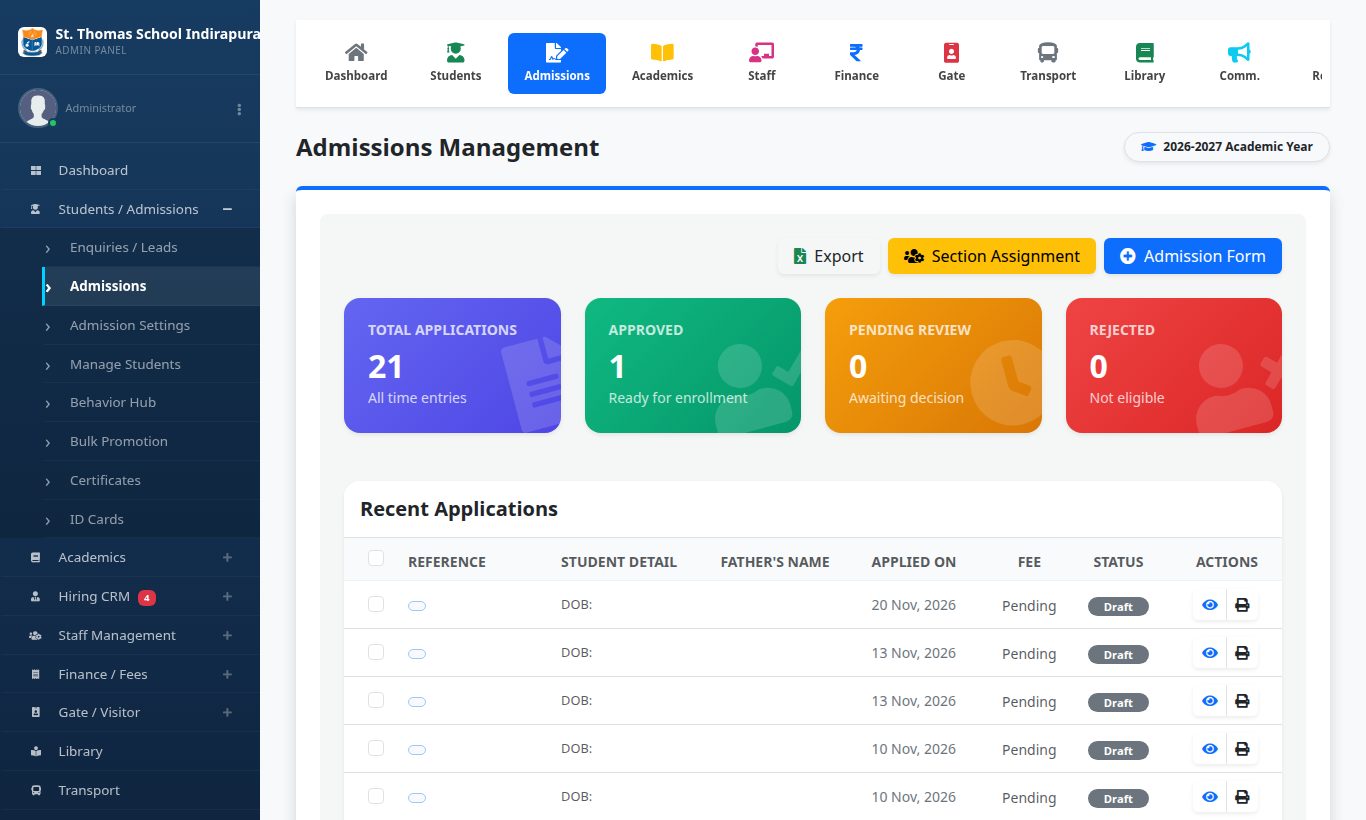
Applications arrive in a single list with counts for total, approved, pending and rejected. From there the office can open an application, edit it, print it, approve or reject it, and export the list to Excel for committee meetings. A sibling lookup by admission number helps staff recognise brothers and sisters already in the school. Approved students get a class section through the section assignment screen, which handles the common end-of-season rush in one place.
Step 5: from approved to enrolled to paying
Approved students flow into the student records and the fee module, so the first fee demand is created from the same data. That is the practical advantage of an all-in-one system: you do not re-enter the student into a second tool. Read more about the fee management side and the wider school ERP.
Who does what in the admissions team
The front office adds walk-in and phone enquiries as they happen. The admissions head works the follow-up list each morning and updates statuses after every call. The principal or committee reviews applications and approves or rejects them. The accounts desk sees approved students in the fee module and collects the first payment. Because each person works in the same system, there is no end-of-week meeting where everyone reconciles their own notebook.
Common admission mistakes software can prevent
- Enquiries with no owner. A follow-up date on every enquiry makes it obvious which families have not been called.
- Lost context. Notes live on the enquiry, so any colleague can continue the conversation.
- Double data entry. Converting an enquiry carries the child and parent details into the application instead of retyping them.
- Unknown lead sources. Recording where each enquiry came from shows which channel is worth the effort next season.
What it costs
Schoolo is priced per school rather than per application or per student. The online admissions form starts on the Growth plan, ₹4,799 a month billed yearly (₹57,590 a year) plus 18% GST, for up to 1,800 students. Every plan includes onboarding and data migration, and you can try Growth free for a year. See the pricing page.
More reading
Common questions.
Straight answers, with no sales spin.
Be ready before admission season.
Start the one-year free trial, or book a demo and we will show the full enquiry-to-enrolment flow.
Start the free trial → Book a demo or call +91 92208 69794